
The IT Assessment widget: a self-service IT security audit for your website
Embed a self-service IT security check on your MSP website with a single iframe. Visitors get an honest IT maturity score in about three minutes — and you get a fully qualified lead with a PDF report, no sales call needed first.
The IT Assessment widget is a self-service IT security assessment you embed on your own website. A visitor answers a short questionnaire, gets an honest IT maturity score in about three minutes, and — without booking a single call — lands in your pipeline as a fully qualified lead with a PDF report attached.
It is one <iframe> line. No plugin, no separate subdomain, no developer. This post is a guided tour: what the widget is, what your visitor sees, and what you get back.
What it looks like
Below is the widget embedded on a live MSP homepage — a dedicated IT security check page with the assessment running inside it. The header, the brand color and the start card all belong to the MSP; only the small “Powered by MSPercury” line gives away the engine underneath.
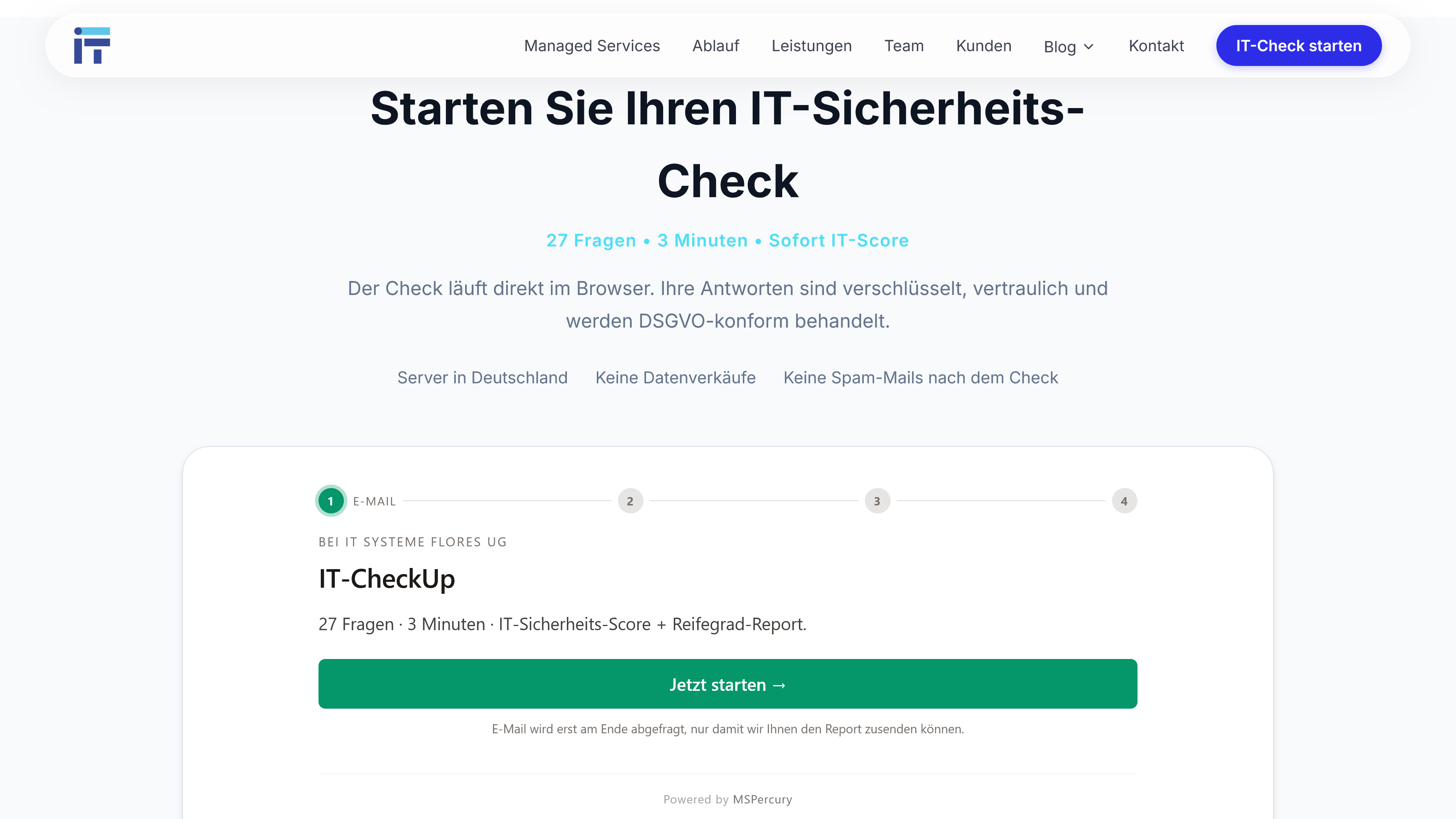
The visitor never leaves the page. The whole flow — including email verification and the final score — runs inside that iframe, on your domain.
What your visitor experiences
The IT Assessment is a guided, multi-step flow designed to feel like a product, not a form:
- Email + 6-digit code. The visitor enters their business email and confirms a one-time code. This kills bot spam and verifies the address before anything else happens.
- The questionnaire. 27 questions in the default catalog — yes / no / unsure — grouped into five categories: Security, Backup, Compliance, Infrastructure and Users. A live score and a progress bar update on every answer, and optional help text explains anything jargon-heavy.
- A little context. Four short fields: company name, industry, size, and an optional phone number.
- The score reveal. A 0–100 IT maturity score with a badge (Gold / Silver / Bronze / Acute), a plain-language explanation, a per-category breakdown, and — optionally — an anonymous benchmark against other companies of the same industry and size.
- The report. A PDF lands in the visitor’s inbox automatically.
Three minutes, a real diagnosis, and not a single calendar invite. For a prospect who suspects their IT is shaky but is not ready to be sold to, that is a very easy thing to click.
It carries your brand, not ours
The widget is white-label by design. Your logo, your brand color and your company name sit at the top of the landing page and on the PDF report. The intro copy is editable per language (EN / DE / ES). To your visitor it reads as your IT security check — because, functionally, it is. MSPercury is just the engine.
What lands in your pipeline
The moment a visitor submits, a new lead appears on your board at /leads:
- The full transcript of all 27 answers
- The total score and the per-category breakdown
- Industry, company size and phone number (if given)
- First-touch attribution — UTM source, medium and campaign, plus referrer and landing URL, captured automatically. You can tell a Google-ad lead from a newsletter lead from a LinkedIn-bio lead.
- A timestamped GDPR consent record (IP + user agent) for your audit trail
- The same PDF report, in your inbox
So your first conversation no longer starts with “tell me about your IT.” It starts with “you marked MFA as no — what is the situation there?” You walk in already holding the data.
Self-service beats the contact form
A contact form qualifies nothing. Whoever fills it in expects a sales call and braces for a quote. The IT Assessment inverts the order:
- Lower friction — a three-minute self-test with an honest result, instead of a calendar invite with an unknown outcome.
- Pre-qualified — before you make contact you already see the weak categories, the industry and the company size.
- A concrete opener — you talk about specific findings from the report, not vague “IT pain.”
- An audit trail — the answers and score stay on the lead record even after it converts to a customer, so your first proposal is built on the same data.
Who should embed it
Any MSP with a marketing site. Drop the iframe on your homepage, build a dedicated landing page for ad traffic, put the link in your email signature, or print a QR code on your business card. It is the same widget everywhere — and every entry point can carry its own UTM tag, so you know what is actually working.
Setting it up takes about five minutes: pick a slug, add your logo and color, copy the iframe snippet. The full walkthrough is in the setup post and the Public IT Assessment guide.
Frequently asked questions
What is the IT Assessment widget?
The IT Assessment widget is an embeddable, self-service IT security assessment that a Managed Service Provider places on their website with a single iframe. Website visitors answer a short questionnaire and get an instant IT maturity score; the MSP receives a fully qualified lead with a PDF report.
How long does the self-service IT security check take?
Around three minutes. The default catalog has 27 yes / no / unsure questions across five categories, with a live score and a progress bar so the visitor always sees how far they have left. The catalog is editable per workspace.
Do visitors leave my website to take the check?
No. The entire flow — email verification, questions and the score reveal — runs inside the iframe on your own domain, under your logo, brand color and company name.
Is the IT Assessment widget GDPR-compliant?
Yes. The privacy consent is captured with a timestamp, IP address and user agent; lead data stays isolated in your workspace; and a ready-made Article 28 DPA template is available for your sub-processor chain.
What does the MSP get when a visitor finishes the check?
A qualified lead in your pipeline: every answer, the total and per-category score, the company’s industry and size, first-touch attribution (UTM source and referrer), and a PDF report emailed to you — the same one the visitor receives.
We built the IT Assessment because we could not keep scaling a manual 30-minute first meeting. Now it runs on every MSPercury workspace, and the leads that come back have already started the journey — you just greet them with the right data already on screen.
— Lucas